
Last updated 6/25/2026
Where to Find and Manage Your Reviews on BranaBee
This guide is for sellers on BranaBee who want to find, read, and understand the reviews customers leave on their products. Maybe you’re keeping an eye on how a new product is landing. Maybe you just received a review you weren’t expecting. Or maybe you simply want to see what people are saying. Whatever brought you here, this article will show you where your reviews live, how the review system works, and what you can (and can’t) do with them.
First, a quick note. Review access is for sellers only, and “managing” reviews on BranaBee probably means something a little different from what you expect. We’ll explain exactly what that looks like below.
Why Look at Your Reviews
Reviews give you one of the clearest, most direct signals about how customers actually experience your products. Sales numbers tell you that something sold. Reviews tell you why people loved it or felt let down.
When you read them regularly, you can:
- Spot problems early. If three people mention that an item runs small or arrived poorly packaged, you’ve found a pattern worth fixing before it costs you more sales.
- Double down on what’s working. Lean into the products and details customers praise, both in your listings and in the inventory you stock next.
- Stay close to your reputation. Shoppers read these reviews while they decide whether to buy, so knowing what they see helps you make smarter decisions for your shop.
If a negative review brought you here, take a breath before you react. A single tough review rarely sinks a shop, and more often than not it points to something concrete you can improve. We’ll cover what to do about it a little further down.
How Often Should You Check?
Because BranaBee collects reviews automatically (more on that next), new feedback can land at any time without you lifting a finger. For most sellers, checking about once a week hits the sweet spot. You’ll catch issues while they’re still fresh, but you won’t turn review-watching into a daily chore.
That said, a few moments call for a closer eye:
- Right after you launch a new product
- During and after a promotion or a busy sales stretch
- Whenever you’ve changed something customers might notice, such as new packaging or an updated product
How It Works – Reviews on BranaBee
BranaBee handles review requests for you automatically. As soon as a customer completes a purchase, we invite them to leave a review, so you never have to chase anyone down for feedback.
On top of that, we tie each review to a specific product rather than to your shop as a whole. As a result, when you look at your reviews, you can see exactly which products earn praise and which ones draw complaints, instead of squinting at one blended score for your entire store.
What you can and can’t do with reviews
Here’s the part that catches some sellers off guard, so let’s be clear about it.
You can view every review left on your products from your Seller Dashboard, any time you like.
You can’t edit, update, approve, or delete reviews, including negative ones.
We do that on purpose, and it’s worth explaining why.
Why Sellers Can’t Edit or Remove Reviews
On BranaBee, reviews work as an honest, independent account from real customers. The moment sellers start approving, changing, or deleting the reviews on their own products, shoppers can no longer trust that they’re seeing the full picture. Instead, they’d always wonder what had been quietly scrubbed away.
So by keeping reviews out of sellers’ hands, we protect the integrity of every rating on the marketplace. Customers know the reviews they read are genuine, which makes them more confident when they buy, and that confidence rewards honest sellers most of all. In other words, a five-star rating means something precisely because nobody could edit it into existence.
This holds true for negative reviews too. We know a bad review can sting, but you can’t remove one simply because you disagree with it. Instead, treat it as feedback: pinpoint the underlying issue, fix what you can, and let your next batch of reviews tell a better story.
Now, if you believe a review actually breaks BranaBee’s guidelines, say it’s spam, abusive, or clearly not tied to a real purchase, that’s a different situation from disliking the feedback. In those cases, reach out to BranaBee support rather than trying to remove it yourself.
Where to Find Your Reviews
First, you must log in to your account.
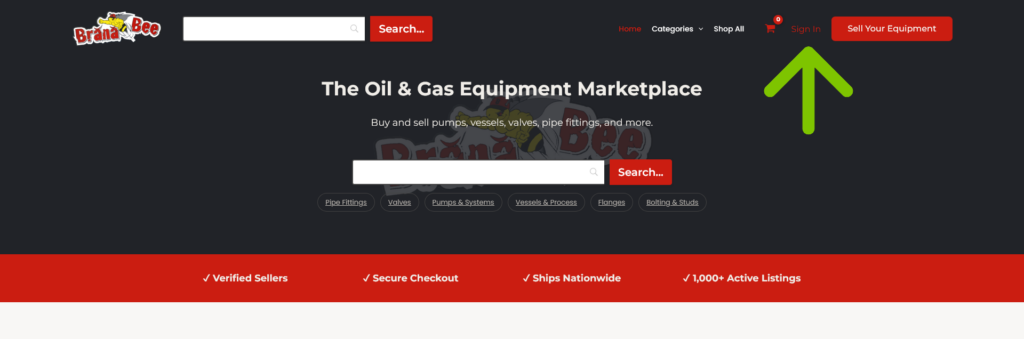
Next, go to the Seller Dashboard.
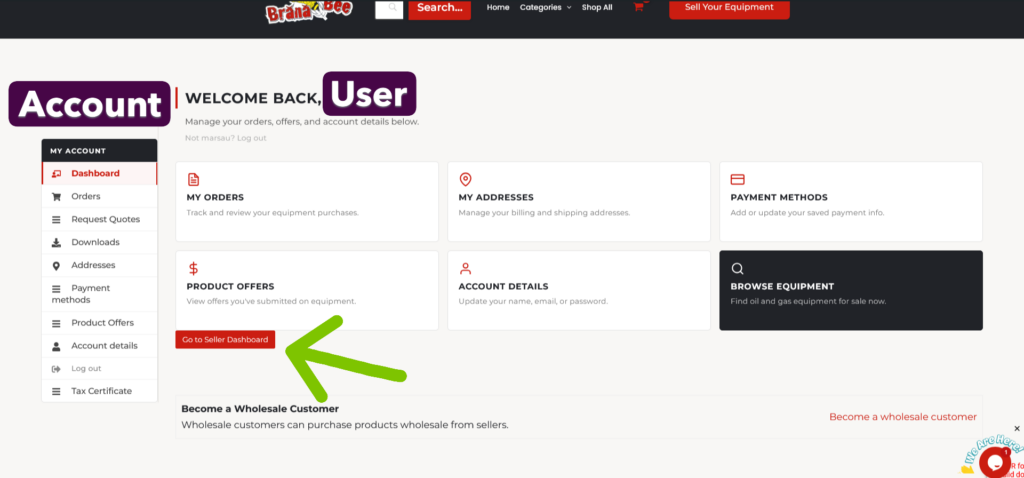
Click ‘Reviews.’
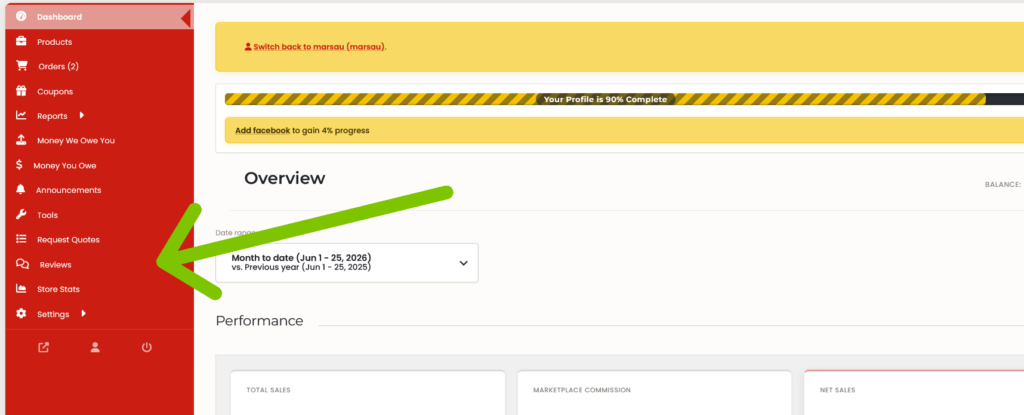
From there, you’ll land on a page showing every review left on your products.
That’s all it takes. Once you’re in, you can read through everything your customers have shared.
Be sure to connect with us on LinkedIn.